CRANE SPORTS ®
MD41819 Strapless
Heart Rate
Monitor.
Fitness
Watch / Pacemaker
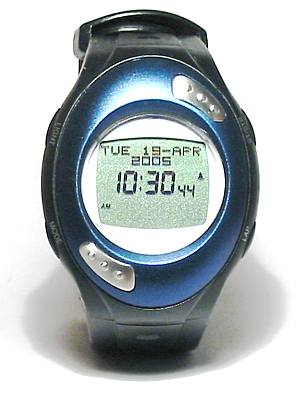 I am
attempting to get fit and saw this watch at Aldi for a good price.
After spending a few hours with it I began to realize just how much
work had been put in by the designer and the programmer of its
software. I spent a good while setting the watch up and trying to
understand how it worked. In the process I searched on the web and when
I found nothing I decided to write up what I had found out. I hope it
helps you.
I am
attempting to get fit and saw this watch at Aldi for a good price.
After spending a few hours with it I began to realize just how much
work had been put in by the designer and the programmer of its
software. I spent a good while setting the watch up and trying to
understand how it worked. In the process I searched on the web and when
I found nothing I decided to write up what I had found out. I hope it
helps you.
This is just an amateur effort
at documentation. It may contain errors or omissions. For confirmation
on any matter refer to the actual products sales literature or to the
distributor. This is not an endorsement of the watch and in fact
my watch just made it through the warranty period before refusing to
take a reading.
It is a long while since I have bought a watch of any sort and I
was surprised at just how many functions can be provided by modern
technology. This is of course a fitness watch but I was surprised to
find extensive time keeping features such as 12/24 hour mode : Dual
time mode (local time + or - whole hours only) : 8 different alarms
that can be set for any day of the week with
various fixed text prompts : Back lighting : 6 re-programmable
countdown timers with optional rollover : Pacer mode 30-180 BPM : Stop
watch 1/100 second :Lap timer 100 laps memory 1/100 second : Total time
for all laps : Average lap time
: These last two functions are limited (on the watch I tested) to 1
second accuracy which is a pity but this is after all a fitness watch
not a super stop watch.

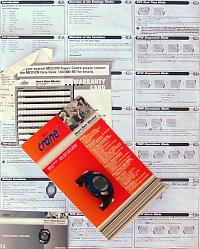
The watch came with a fold out book of instructions that were
fairly easy to follow and a 12 months guarantee card. The button
referred to in the instructions as
"SET" is marked on the watch as "LAP" which is no great problem as
there is a diagram showing just what is meant. The TMR
instruction panel (18) should say "Hold down the LIGHT button for
2 seconds" instead of the SET button for 5. The next panel (19) refers
to "SET" instead of "LIGHT" these are minor problems. The
translator must have been a bit confused when describing the PCR
Pacer Mode. If you replace "seconds for each step" with "steps per
minute" and "in 5 second units" with "in 5 step units" it all
becomes clear.
The real Heart of this watch.
 The nifty function of this watch is its
ability to
read your heart rate. While wearing it it easy to reach across with
your hand and put a finger on each of those prominent pads and in about
5 seconds you have a reading. You can take a reading when the
watch is in any mode and for a few seconds, you can see the rate and
the percentage of your maximum heart rate (see later). In heart rate
mode you can
recall each of the last 100 of your readings showing the date, the time
, the percentage of maximum and reading number. Pressing
another button gets you the lowest and highest readings. My first
use of this watch was to run through my usual exercise taking my heart
rate
every 5 minutes so I could later plot a graph. I was exercising
at a known rate so in a few months I will be able to repeat
the process and watch my progress.
The nifty function of this watch is its
ability to
read your heart rate. While wearing it it easy to reach across with
your hand and put a finger on each of those prominent pads and in about
5 seconds you have a reading. You can take a reading when the
watch is in any mode and for a few seconds, you can see the rate and
the percentage of your maximum heart rate (see later). In heart rate
mode you can
recall each of the last 100 of your readings showing the date, the time
, the percentage of maximum and reading number. Pressing
another button gets you the lowest and highest readings. My first
use of this watch was to run through my usual exercise taking my heart
rate
every 5 minutes so I could later plot a graph. I was exercising
at a known rate so in a few months I will be able to repeat
the process and watch my progress.

At Rest Heart Rate Mode. Is the mode after the Heart Rate memory mode. It is
unnamed and shows a bar graph at the top and the latest resting
heart rate. The rate displayed is used in the calorie consumption
calculations and it also goes into the bar graph so it is
important that it has the correct information. Do not use this mode to
take a general heart rate. I recommend that you should first take a
resting heart rate in some other mode and when you are happy that you
are
at your most rested, repeat the reading in this mode.
The following modes all have to
know that you are exercising and the watch assumes this whenever
the stopwatch is running so if you want to keep long term data on
Calorie consumption etc. correct you will not be able to time car races
with the stopwatch function. Note the Heart
zone, Calories used
and the Fat burn displays can
be viewed while exercising ie. stop watch running or halted, but they
are cleared when the stop watch is reset.

Heart Rate Zone Mode. This
process keeps track of which zone your heart rate is in
during an exercise period. You can manually set two levels. The time
spent exercising below, between and above these levels is recorded and
shown on the IN, HI
and LOW zone displays. You can choose to have these two levels
automatically
determined for you and then you are given a choice of Health (50-65% 0f
EMHR), Fat Burn (55-65% of EHMR) or Fitness (65-80% of EHMR). There
is an optional warning tone. Because your heart rate is not being
continuously monitored you should take a reading at the start, as soon
as your heart is up to speed, then regularly and whenever
your exertion level changes.
Calorie Consumption Mode. The
heart rate while you exercise is a good indicator of the level of
energy expenditure so with a bit more information the Calories consumed
by exercise and thus your weight lose can be estimated. To obtain this
there is a Calorie setting mode that allows input of your sex, age
(4-99),
height (20-240 cm), weight
(20-227 Kg), target
calories, maximum heart
rate, and log interval. With this information your
Body Mass
Index (BMI) can be calculated and a determination of your weight class
made. Your class (obese, normal etc.) is indicated with
from
0 to 5 hearts together with the BMI.
Note changing the log interval seems to have no effect. It may be used
in another model that has continuous heart monitoring.
The Calories used during exercise are calculated using the
elapsed time, the
resting heart rate (see above), the latest heart rate and the other
information you entered above. See here for my
explanation of the formula. Note if you were to
exercise and not take any heart rates then the last taken rate would be
used and this is meaningless so take readings as soon as your heart
speeds up and at any change of pace.

Provided you have not reset the stop watch you can see the Calories
used
and a bar
graph of arrow heads indicating the progress towards your Target Calories. The display shows
the result of 1/2 hour of moderate stationary bike exercise.

There is also a display of the fat
loss
in pounds for this session.

There is a Weekly Accumulation display that runs Sunday through
Saturday and shows the running total.
 A current week numeric and chart display that shows the
total for the week from Sunday up to the previous midnight. You can
show up to 8 previous weeks at a push
of the ST/STP button.
A current week numeric and chart display that shows the
total for the week from Sunday up to the previous midnight. You can
show up to 8 previous weeks at a push
of the ST/STP button.
Some of the displayed characters
are small but this is
a great device considering the low price I paid of A$39.99. I
exercised for 1/2 an hour on an ergonometer taking
readings
every 5 minutes and the Calorie consumption was as expected. I entered
in a different body weight and a different resting heart rate and
repeated the process
and the Calories changed as expected so it takes this information into
account. There
is a couple of things I would like added. Fat loss in Kg not just
pounds, 1/100 sec.
reporting of total and average lap time and a mode switch to use the
stop
watch
without it counting calories. I wore the watch all day yesterday and
measured my heart rate on a fast walk to the shops. With just a bit
more effort I found that I could get my body into the fat burn mode and
do myself some good.
Update. I have used this watch every day for about 6 months and it is
now a vital part of my exercise programme.
Further update—the watch died just out of warranty but it lead a hard life on a dripping wet wrist and was a low cost product.
If you have any comments or
suggestions please contact me (see other pages for mail info.)
.
HAVE A LOOK AT MY OTHER PAGES